 Ciaobot
Any AI model
Bring the AI you already use
Your agents do the work. Ciaobot keeps the context. Connect Claude Code or OpenCode using your existing provider access, and add a persistent personal workspace around them.
Why Ciaobot doesn't build its own agent
Claude Code and OpenCode already handle the model and tool execution loop. Ciaobot starts and supervises their sessions, adds workspace and project context, and keeps files, recurring tasks and reviewable memory around the work. It builds on those agents rather than replacing them.
Why not just use either agent directly? You can. Ciaobot is for when you want short tasks to share durable context, documents to review beside the chat, and useful knowledge to survive the end of a session.
Change your AI, not your second brain.
Your notes, project context and remembered preferences stay in a folder you own. They remain ordinary Markdown, useful with another agent or text editor even when Ciaobot is not running.
This is continuity of your workspace, not a promise that provider sessions are interchangeable. A handover gives the other provider visible conversation history; its tools, permissions and supported capabilities may differ.
Claude: through Claude Code
For Anthropic's models, Ciaobot uses Claude Code, Anthropic's own agent, through its official SDK. That means you use your Claude subscription exactly as Anthropic intends. Sign in once with claude auth login and Ciaobot uses that session.
If the model you picked is busy or unavailable, Ciaobot steps down to the next one automatically instead of failing the chat.
Everything else: through opencode
For every other provider, Ciaobot uses opencode, an open-source agent that connects to dozens of providers:
- OpenAI models, with a ChatGPT plan or an API key;
- OpenRouter, for hundreds of models behind one account;
- Z.ai (GLM) and other hosted providers;
- Ollama Cloud, or Ollama running locally on your own machine, fully offline;
- LM Studio and any OpenAI-compatible endpoint.
Connect a provider with opencode auth login. Every model opencode can reach appears in Ciaobot's model pickers by itself.
You keep your plugins, skills and MCP servers
Ciaobot starts Claude Code and opencode with your normal settings, not a stripped-down copy. So whatever you've already set up there keeps working in Ciaobot chats:
- Claude Code: your skills, subagents, commands, plugins and MCP servers, plus the connectors you've enabled on claude.ai (Slack, Notion, Atlassian and so on).
- opencode: your global configuration, providers, plugins, skills and MCP servers.
On top of that, anything you add inside Ciaobot is shared by both tools: an MCP server you add in Settings → MCP servers, a skill in Settings → Skills, a subagent in Settings → Subagents. Ciaobot writes each one once and translates it into the format each tool expects. How to add your own →
Pick a model per workspace, per chat, per job
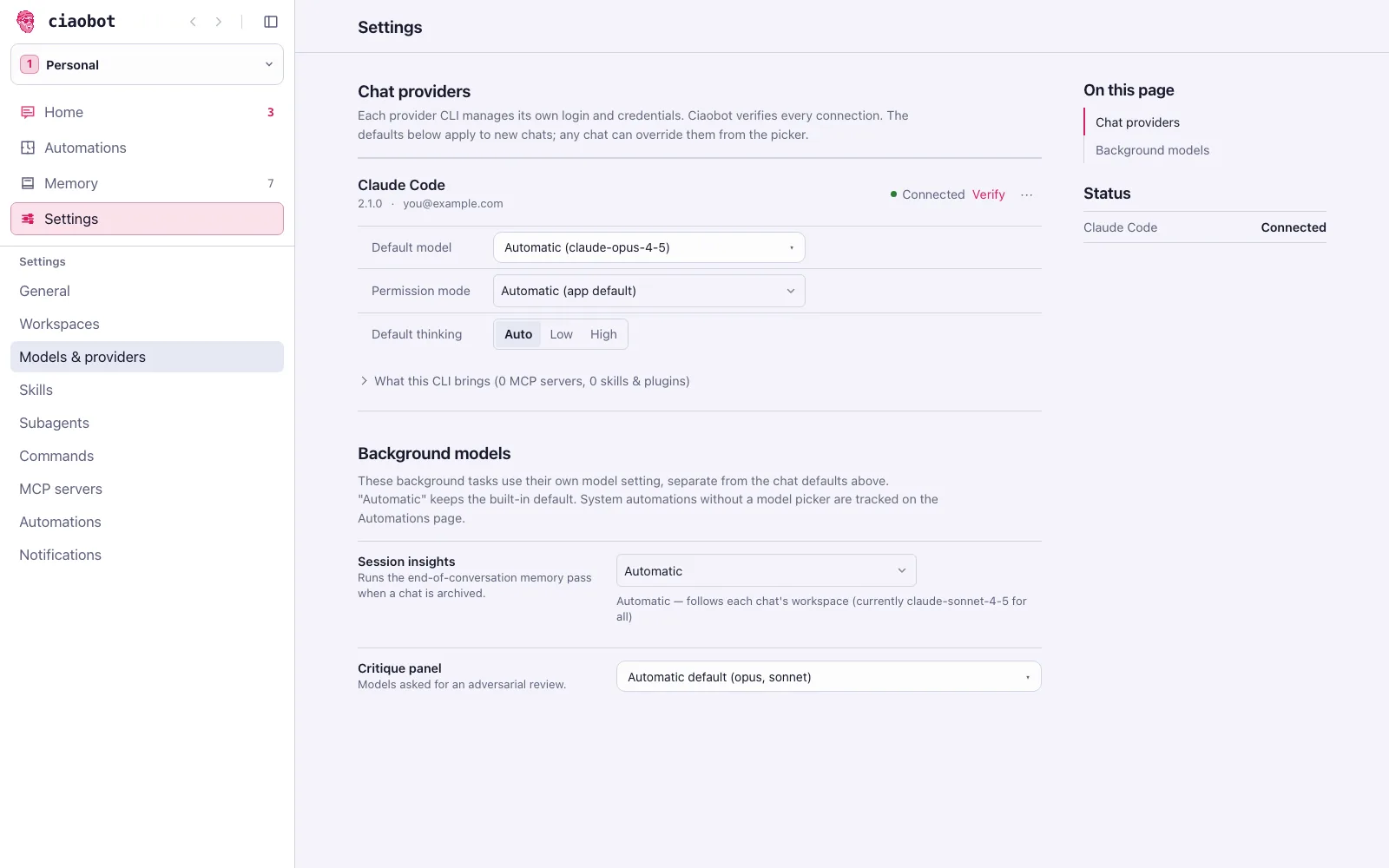
- Per workspace: Settings → Workspaces sets which tool each workspace uses by default, for example Claude for Work and a local model for Personal.
- Per chat: click the model chip in the chat header (⌥+M) to change model or thinking level. Switching to the other tool hands the chat over with its visible history.
- Per job: automations, memory extraction and the
/critiquereview panel each have their own model setting.
Get independent second opinions with the critique panel
Ask for a critique in a chat with /critique or the critique skill. Ciaobot sends the same plan, answer or file to each model in the panel for an independent adversarial review, then compares their findings and recommends whether to ship, revise or block. You can also run ciao critique --input plan.md --type plan in a terminal.
Settings → Models & providers → Critique panel controls which models take part. On Automatic, the panel combines the distinct effective default models of your configured workspaces: each workspace’s default provider uses its configured model default. A provider you have not signed in to is skipped. Choose models in the picker to override the automatic panel; clear the selection to use workspace defaults again.